Ten Times the Takeoffs.
Zero Late Nights.
Analyze Blueprints
Drag & drop your PDFs or click to browse · Up to 5 files
Pay Per Estimate.
No subscription. Upload a drawing set, get a structured takeoff and bill of quantities, and pay only for what you run.
No blueprint? No problem. A full, detailed written description of the job works just as well — the system builds your estimate straight from the scope of work.
Once-off estimates are a one-time purchase. Selected Trade Estimation ($79–$139) and the Full Blueprint Analysis ($299) are charged only when you run them, so the 30-day money-back guarantee does not apply. It covers the monthly Professional Estimator subscription below. See what's covered
Estimate
Price a limited selection of trades (1-5) fast, no subscription.
- ✓One trade included ($79 base)
- ✓Add up to 4 more trades ($15 each · max $139)
- ✓6th trade = Full Blueprint Analysis
- ✓Structured BoM · PDF & CSV export
Full Blueprint Analysis
One-time run of your whole project — every trade.
- ✓Entire project — all trades & phases
- ✓One-time payment, no subscription
- ✓Max 2 purchases per rolling 30 days
- ✓Complete BoM & cost breakdown
- ✓White-label documents with your logo
Professional Estimator
High-volume analyses for pro estimators.
- ✓1 Professional Estimator license · 25 analyses / month
- ✓Add up to 10 extra licenses ($280 +10 / $440 +25 analyses)
- ✓Unlimited discounted analysis packs (5/$110, 10/$200, 25/$475, 50/$900)
- ✓White-label documents with your logo
- ✓No marketplace, PM, or field users
Estimator Pro
Commercial-use & white-label for estimating bureaus.
- ✓Commercial-use rights
- ✓White-label reports for clients
- ✓Negotiated high-volume estimating capacity
- ✓Dedicated account support
Your first estimate is on us · No card required to try · Upgrade to Command anytime
Your quantity surveyor that never gets tired
Estimating is judgment work — but most of your day is spent on the mechanical part: counting, measuring, and transcribing quantities off drawings. BuildIG.ai automates that mechanical layer with sub-millimeter digital analysis, so your expertise goes toward pricing strategy, not pixel-counting.
Every quantity is traceable back to the drawing, so your numbers are defensible in a bid review. You stay in control — BuildIG.ai just gets you to the priced estimate faster and with fewer errors.
- Structured takeoffs organized by CSI MasterFormat
- Every measurement traceable and reviewable
- Export to CSV and Excel for your cost database
- Pay-per-use pricing when you don't need a subscription
Watch the AI read any drawing.
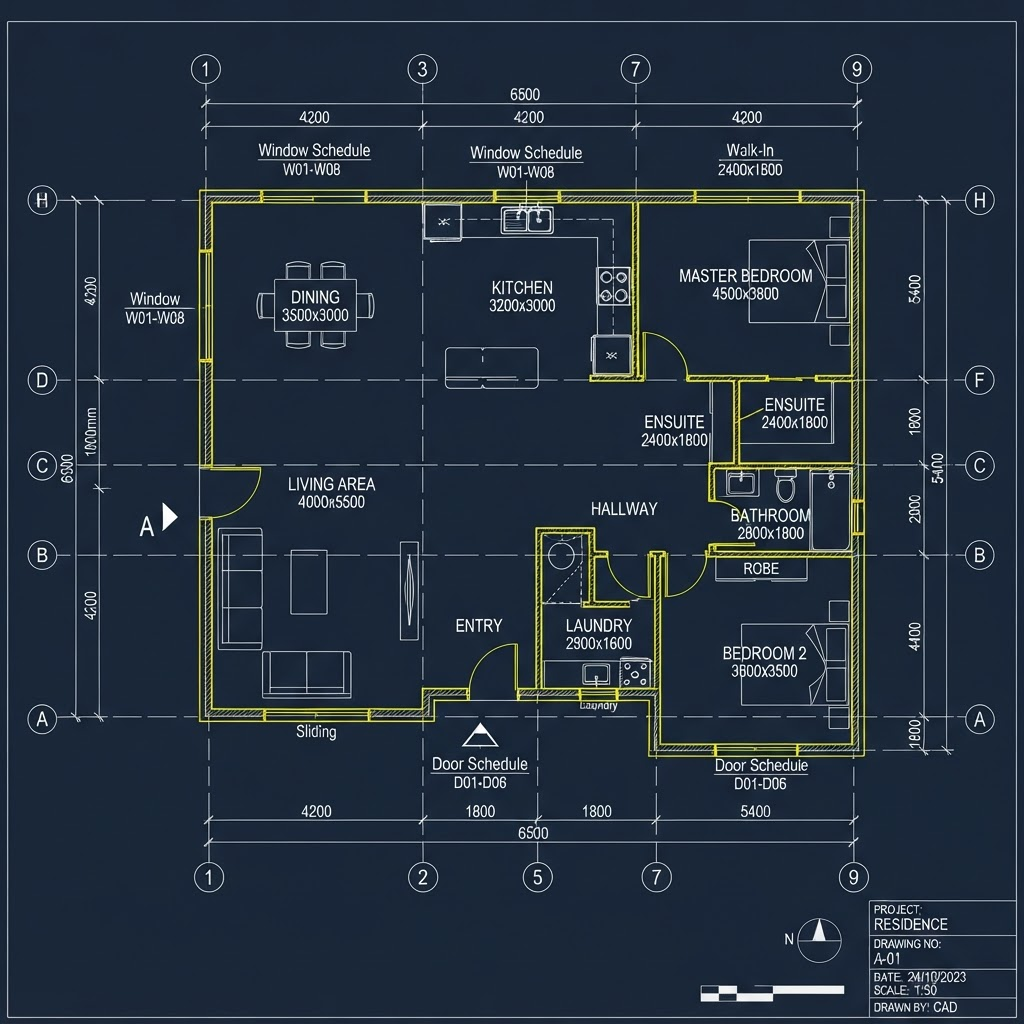
BuildIG.ai's computer-vision engine scans every sheet the way a senior estimator would — identifying walls, openings, and assemblies, then measuring each one to build a structured, traceable takeoff.
- Reading drawing set…
- Detecting walls & openings…
- Measuring areas and lengths…
- Classifying materials…
- Generating Bill of Quantities…
From drawing to priced estimate in 4 steps
Keep the parts of estimating that need you. Automate the parts that don't.
See how it fits your workflow — book a live demo.
Book a DemoThe 4-step estimating flow.
From the first project parameter to a client-ready quote, every number stays auditable. Select a step to see what happens.
Step 1 of 4
Initiation
Set the scope, lock in the project baseline, and upload your plan set to feed the AI.
Scope & Project Type
Define the analysis scope — Estimate Type (Full Blueprint vs. Selected Areas) and Project Type (Standard vs. Renovation) — which tunes the AI's assumptions about demolition and existing structure.
Project Baseline
Enter the project name, start date, budget level, and site address. The start date anchors the time bank used to forecast material escalation and labor rate shifts across the build.
Localization
The site address triggers geographic logic so pricing, subcontractor mapping, and currency formatting default to local market rates and regional construction standards.
Blueprint Upload
Upload the PDF architectural drawings. BuildIG.ai verifies the file and prepares it for the extraction engine to interpret scale, dimensions, and specifications.
Built for the way estimators actually work
Speed and accuracy on the takeoff, full control on the pricing.
Auditable Measurements
Every quantity links back to the drawing region it came from — defensible in any bid review.
CSI MasterFormat Output
Takeoffs arrive organized the way you already estimate, ready to price.
Multi-Format Input
Handle PDF, DWG, DXF, and image files without conversion or re-drawing.
Your Rates, Your Markup
BuildIG.ai never guesses your pricing — you apply your own cost database and margin.
Scope from Descriptions
No drawings yet? Generate a preliminary takeoff from a scope of work or spec.
Pay-Per-Use Option
Use the standalone Estimator per project, or subscribe when volume justifies it.
Not sure where to start? Upload a plan and see it analyzed.
No Drawings? No Problem. No Excuses.
Full blueprints, trade-specific sheets, or just a job description. BuildIG.ai delivers automated quantity takeoffs and complete construction BOQs however your project starts.
Upload complete architectural and engineering drawings, and BuildIG.ai will analyze the entire project — generating quantities, materials, timelines, and cost intelligence across all trades.
How It Works
Our AI scans every sheet of your blueprints, identifying structural elements, MEP systems, finishes, and site work. It cross-references specifications with regional pricing data to deliver comprehensive takeoffs.
Key Features
Best For
- Large commercial projects
- Multi-family residential
- New construction
- Projects requiring full scope analysis
Output Includes
- Complete BOQ across all trades
- Material quantities with waste factors
- Labor hour estimates
- Cost projections with regional adjustments
- Project timeline suggestions
Only working on a specific scope? No problem. BuildIG.ai includes selective analyzers designed specifically for individual trades, delivering accurate quantities without the noise of a full project analysis.
How It Works
Select your trade specialty, upload relevant drawings, and our AI focuses exclusively on extracting quantities and specifications for that scope. No distractions from other trades.
Key Features
Available Trade Modules
Best For
- Subcontractors bidding specific scopes
- Trade-specific renovations
- Specialty contractors
- Quick trade estimates
Output Includes
- Trade-specific material lists
- Fixture and equipment counts
- Labor estimates for scope
- Code compliance checks
- Specification matching
Not every job starts with drawings. Simply provide a detailed job description, scope of work, or specifications — and BuildIG.ai will generate its best-possible estimate based on construction intelligence and regional data.
How It Works
Describe your project in detail — dimensions, materials, scope of work, location. Our AI leverages millions of data points from similar projects to generate realistic estimates and material lists.
Key Features
Best For
- Early-stage budgeting
- Renovation projects
- Small works & repairs
- Feasibility studies
- Quick client quotes
Output Includes
- Estimated material quantities
- Rough cost projections
- Suggested specifications
- Timeline estimates
- Risk factors to consider
Click on any analysis mode above to learn more about its capabilities.
Bid Faster. Build Smarter. Win More.
Two powerful modules that replace five tools. Zero learning curve, maximum impact.
Which Side Are You On?
BuildIG.ai connects estimating and project management into one intelligent ecosystem. Start on either side — most teams use both.
Estimate
Estimator · Pay-per-use
- ✓Upload blueprints
- ✓Generate takeoffs
- ✓Create Bills of Materials
- ✓Produce quotations
- ✓Cost forecasting
- ✓Procurement planning
- ✓Concept pricing
AI Project Management
Command · Subscription
- ✓Manage live projects
- ✓Track schedules
- ✓Monitor budgets
- ✓Coordinate teams
- ✓Daily reporting
- ✓RFIs & change orders
- ✓Complete project lifecycle
Sketch to Blueprint
Have a hand sketch or concept drawing? Upload it and let BuildIG.ai convert it into a digital blueprint that's ready for AI-powered estimating. Perfect for early budgeting, feasibility studies, and pre-construction planning.
Don't Take Our Word For It. Verify It.
99.5% accuracy on all materials, verified by Senior Quantity Surveyors. Every number is traceable, reviewable, and built on real construction logic.
Verified by Senior Quantity Surveyors
From upload to complete BOQ
Compared to manual takeoffs
A construction family that learned to code.
BuildIG.ai comes from a family with generations in the construction industry, so the logic is built on how jobs are actually won and lost, not guesswork. Our dedicated engineering and QA teams refine the estimating engine continuously alongside veteran Quantity Surveyors, and every release is stress-tested against real-world takeoffs before it ships.
Commercially launched April 2026
Live and pricing real projects around the world.
Exhibiting at the Austin Build Expo
Meet the team on the show floor.
Backed by committed equity partners
Funded to build for the long haul.
"We used to spend 3 days on a single takeoff. BuildIG.ai does it in under 15 minutes with accuracy we can actually verify."
James T.
Senior Quantity Surveyor · United Kingdom
"The difference is night and day. We went from submitting 4 bids a month to 12. That alone paid for the platform in the first week."
Carlos M.
General Contractor · Texas, USA
"As a project manager, having the materials list and timeline before breaking ground changed how I plan every project."
Sarah K.
Project Manager · Sydney, Australia
"I was skeptical about AI doing takeoffs. The 99.5% accuracy claim checked out. I verified it line by line on a commercial project."
David R.
Estimator · California, USA
Professional Estimator FAQ
What estimators want to know before trusting AI with their numbers.
Can I trust the measurements in a bid review?
Does BuildIG.ai set my prices?
What drawing formats can I upload?
Can I use it for just one bid without subscribing?
How do I get the takeoff into my estimating software?
Ready to win more bids? Get started today.
AI Blueprint Analysis & Automated Quantity Takeoff FAQ
Everything contractors need to know about AI-driven construction estimating
How does AI improve takeoff accuracy?
What file formats are supported for automated quantity takeoffs?
How long does an automated quantity takeoff take?
Is my blueprint data secure?
Can I export the AI-generated BOQ to my existing estimating software?
How does the AI-driven construction BOQ differ from manual takeoffs?
Does BuildIG.ai work for subcontractors bidding on specific trades?
What if I don't have blueprints — just a job description?
How much does BuildIG.ai cost?
Does BuildIG.ai handle global standards?
Every Manual Takeoff
Costs You a Bid.
Construction firms in your area are saving 80+ hours per bid and winning 3x more projects.
While you spend 3 days on a takeoff, your competitor submits in 15 minutes. The cost of inaction is measured in lost contracts.